



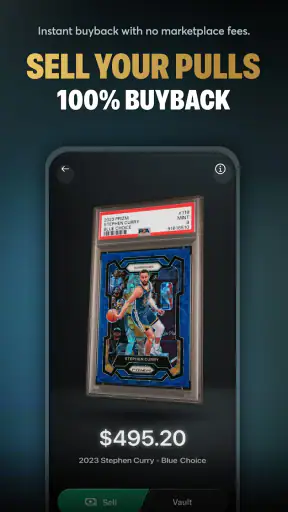



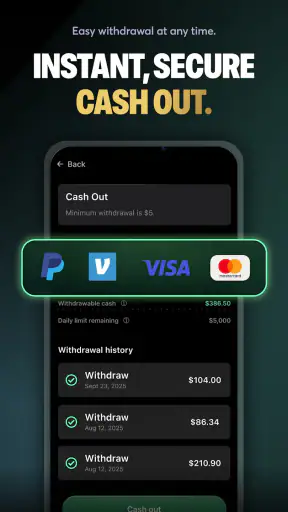

Opening a digital trading card pack can be exciting, but the experience changes a lot depending on how clearly the app communicates what is happening. I spent time with Rips by Triumph to look beyond the quick thrill of revealing a card and focus on how comfortably different people can use it. This is a free entertainment app from Triumph Labs Inc. built around opening card packs, finding rare cards, and cashing out real money. That combination makes it more than a simple collection viewer: it asks users to follow a fast, visually driven process while also making decisions that may have financial consequences.
My overall impression is mixed in a useful way. The central idea is easy to understand, and the app has obvious appeal for people who enjoy the suspense of pack openings. At the same time, an experience involving chance, valuable cards, and withdrawals needs especially clear navigation and calm presentation. Someone with limited vision, reduced dexterity, sensitivity to rapid visual effects, or difficulty processing dense screens may need more patience than a typical entertainment app demands. I would recommend approaching it as a focused hobby rather than as a dependable way to make money.
How the interface supports reading and navigation
The first thing I look for in an app like this is whether the main journey is understandable without guesswork. Rips by Triumph has a straightforward conceptual path: choose or open a pack, watch the reveal, inspect what appeared, and decide what to do next. That familiar sequence helps new users form a mental map quickly. You do not need to understand traditional card collecting before trying it, although knowing the difference between rarity, personal value, and resale value would make the decisions easier.
The visual nature of pack opening can be engaging, but it also creates a readability challenge. Important information may compete with artwork, reveal effects, labels, and action controls. I found that the best way to use this kind of app is to slow down after each reveal instead of treating the animation as the whole experience. Give yourself time to read the card name, examine its details, and understand which action is available. That small habit is particularly helpful if you have dyslexia, attention difficulties, or simply prefer not to make decisions under pressure.
Text size and contrast matter more here than they would in a basic video or music app. A card may be visually attractive while still being difficult to interpret if its lettering is small or placed over a busy background. Users with low vision should pay attention to whether the information remains readable on their own device and at their preferred display settings. I would not assume that enlarging system text will improve every part of the interface, because some app layouts handle scaling better than others. Testing the first few screens before spending time or money is sensible.
Navigation also affects confidence. When real-money cash-out is part of the product, I want every important action to feel deliberate rather than accidental. A good personal workflow is to separate browsing from committing: first inspect the card and its displayed options, then pause before selecting a sale or withdrawal-related control. This is not just a financial precaution. It also helps users who need extra time to read, remember instructions, or confirm that they have selected the intended item.
The app’s public reception suggests that many people find the core experience approachable. It holds an average rating of 4.6 from around 43 thousand ratings, with roughly 6 thousand written reviews and over 1 million installs. Those figures show meaningful adoption, but they do not tell me whether the interface works equally well for every ability or situation. Popularity is useful context, not proof of inclusive design.
Making the reveal easier to follow
For a user who finds fast transitions distracting, I would treat the reveal as something to observe rather than rush through. Keep your device at a comfortable distance, use a quiet environment, and avoid opening packs while multitasking. If you are sharing the experience with a child, remember that the app is marked Mature 17+, so it is not an appropriate choice for younger users even if the card-opening format looks playful.
People who struggle with working memory may benefit from taking a quick note of a card’s name or value before moving on. This reduces the need to remember several visual details at once. It is also a practical safeguard against confusing one card with another when a session contains repeated designs or multiple reveals.
Screen readers and magnification tools can be useful in many mobile contexts, but I would test them directly with the app rather than assume that every decorative element, card label, or action is announced in a helpful order. If a control is represented mainly through imagery, that can become a serious barrier. The right decision is simple: if you cannot reliably identify the card and the next action using your preferred accessibility setup, the app is not currently serving your needs well enough for financial decisions.
Motor, sensory, and cognitive considerations
Pack-opening apps often reward quick taps, but speed should not be necessary for a fair and comfortable session. Users with tremors, limited reach, arthritis, or other motor conditions may find repeated tapping and small controls tiring. I would use a stable grip, place the phone on a surface when possible, and take breaks between openings. A larger tablet may improve visibility, though it can also make some controls harder to reach with one hand.
The most important motor trade-off is the relationship between a small tap and a meaningful outcome. Opening a pack is one action; deciding what to do with a rare card is another. Those steps should ideally feel distinct. If you have difficulty with precise touch input, avoid using the app while walking, riding in a vehicle, or holding other objects. A mistaken tap is more frustrating when the surrounding context involves a card that may have monetary value.
Sensory comfort is another concern. A dramatic reveal can be enjoyable for one person and overwhelming for another. Bright artwork, movement, sudden changes, and repeated visual emphasis may be difficult for users with migraine triggers, vestibular sensitivity, photosensitivity, or attention regulation challenges. I would recommend starting with a short session in a controlled environment. If the visual presentation causes discomfort, stop rather than trying to push through it. An entertainment app should not leave you feeling physically unwell.
Sound can also change the experience, especially in shared spaces or for people who process audio differently. I prefer beginning with the device volume low or muted so that the visual information can be judged on its own. This is useful on public transport, in an office, or beside someone who is sleeping. It also makes the app more discreet when the user does not want the reveal to attract attention.
Cognitive load increases once the app moves from entertainment into money-related decisions. The excitement of finding a rare card can make it harder to evaluate whether cashing out is actually worthwhile for your personal goals. I suggest deciding on a session limit before opening anything and writing down the amount you are comfortable spending, if any. Do not let a disappointing reveal turn into a reason to keep opening packs. That boundary is especially important for people who are prone to impulsive decisions or who find variable rewards difficult to resist.
A practical routine for different users
My preferred routine is deliberately unglamorous. I open the app when I have enough time to read the screen, keep the phone stationary, review each card separately, and stop after a preset number of openings. I then check the collection or cash-out path only after the excitement of the reveal has passed. This separates the emotional part of the experience from the practical part.
For someone with low vision, the same routine could include using the device’s preferred magnification and checking whether card details remain legible before proceeding. For someone with limited dexterity, it could mean using two hands and avoiding rapid repeated actions. For someone with sensory sensitivity, it could mean muted audio, reduced environmental distractions, and very short sessions. None of these approaches changes the app itself, but they can make its central interaction less demanding.
Users who need another person’s assistance should agree on roles before starting. One person can describe the card and read the available choices while the other confirms the intended action. That may sound excessive for entertainment, but it is reasonable when the app combines visual information with potential cash-out decisions. The helper should support the user’s choice, not make the decision on their behalf.
Using it in everyday situations
Rips by Triumph fits best into short, intentional sessions. Imagine finishing work, sitting at home, and wanting a few minutes of card-opening suspense. In that setting, you can use both hands, adjust the screen to a comfortable angle, mute the sound if needed, and take your time reviewing the result. The app’s entertainment value is strongest when you are present for the reveal rather than opening packs while distracted.
It is less suitable when your attention is divided. I would not use it while commuting on foot, supervising a task that needs constant focus, or in a place where glare makes the screen hard to read. A moving bus or train can make precise tapping difficult, and public surroundings may make it harder to think clearly about a withdrawal decision. These are not minor inconveniences when a single action may affect a card you wanted to keep or cash out.
The Mature 17+ rating should shape the context as well as the audience. Parents should not treat the app as a harmless children’s card game simply because the presentation involves collecting. Teenagers and adults who use it should understand that the money element changes the nature of the activity. I would explain the difference between entertainment spending and income before recommending it to a younger adult who is new to digital collectibles or chance-based purchases.
It can also work as a social activity, but accessibility needs to remain part of the plan. If friends are watching a reveal together, avoid letting the group pressure one person into opening another pack or making a quick sale. Someone who reads more slowly or needs a quieter screen should be given the same time as everyone else. The social atmosphere can make the app more enjoyable, but it can also make impulsive choices feel normal.
For users with inconsistent internet access or limited data, the practical question is whether the app remains comfortable when connectivity is not perfect. I would avoid beginning a financially important action in a weak-signal area. Wait until the phone is stable and you can verify what the screen shows. This is a general caution for any app involving transactions, but it matters particularly here because the excitement of a reveal can encourage users to tap before checking the result.
What may still create barriers
The largest barrier is the gap between visual excitement and accessible information. A card reveal can be attractive without being easy to read, and an animation can be memorable without helping a user understand the available choices. If the app does not present essential card details in a clear, consistently structured way, people with visual, cognitive, or sensory disabilities may be placed at a disadvantage.
Another barrier is the emotional design of rarity. Rare cards naturally attract attention, and the possibility of cashing out can make the reveal feel urgent. Users who need more time should not have to compete with countdown-like pressure, prominent calls to action, or confusing transitions. My advice is to treat any sense of urgency as a reason to pause. If you cannot inspect a decision calmly, wait until you can.
Financial accessibility deserves equal attention. “Free” makes the app easy to try, but it does not mean every part of the experience is financially low-risk. A person may have no difficulty navigating the interface and still find the pack-opening model unsuitable for their budget or wellbeing. I would skip it entirely if you are looking for predictable returns, a conventional card marketplace, or a collecting app without chance and cash-out elements.
It is also not the best alternative to a traditional card database. A database is better when your goal is to research sets, compare cards methodically, or maintain a collection without dramatic reveals. A standard digital card game is better when you want strategic matches and clear competitive rules. A conventional marketplace is better when you already know which card you want and prefer a direct purchase to an uncertain opening. Rips by Triumph is aimed at the suspense of discovery, not at replacing all of those experiences.
Device compatibility is relatively broad because the app supports Android 7.0 and later, but operating-system support alone does not guarantee a comfortable experience. Older phones may have smaller screens, less responsive touch input, or weaker performance with visually rich content. Before committing to a long session, I would test the app on the actual device you plan to use. Comfort, legibility, and reliable tapping matter more than simply being able to install it.
The current version is 1.40.0, and keeping an app updated is generally sensible for usability and security. Still, an update can change layouts or move controls, which may temporarily disrupt users who rely on a familiar workflow. After an update, I would review the first screen slowly and confirm where the important actions are before opening a valuable pack or attempting a cash-out.
An inclusive verdict for the right kind of collector
I enjoyed the focused idea behind Rips by Triumph, especially for people who like the reveal itself more than the long-term organization of a collection. It is easy to understand at a basic level, free to start, and clearly popular enough to have built a substantial audience. Triumph Labs Inc. has positioned it in entertainment, but the real-money element means users should bring more care to it than they would to an ordinary card-opening animation.
My recommendation depends heavily on how you interact with screens. If you read visual interfaces comfortably, have steady touch control, enjoy suspense, and can set firm spending boundaries, it may be a fun occasional activity. If you need strong screen-reader support, dislike rapid visual effects, have difficulty with small targets, or want a calm and predictable collecting tool, I would choose a different option unless your own accessibility testing shows that this one works well for you.
The most useful tip I can offer is to judge the entire workflow, not just the first reveal. Can you identify the card? Can you read the relevant information? Can you tell what each button will do? Can you pause before a money-related action? If the answer to any of these is no, the excitement is not worth sacrificing control. Accessible entertainment should leave room for deliberate choices, not reward whoever can react fastest.
For me, the app succeeds as a short, visually engaging pack-opening experience but needs to be approached with clear personal limits and realistic expectations. It is not the right choice for guaranteed value, direct purchasing, or users who cannot comfortably verify visual and financial decisions. Used carefully, it can provide a novel collecting moment; used impulsively or in a difficult environment, its biggest strengths can become its biggest sources of friction.
That makes my final view straightforward: try it only when the interface is readable on your device, the sensory presentation feels comfortable, and the cash-out concept fits your habits. If those conditions are met, Rips by Triumph is worth exploring as an occasional entertainment app. If they are not, a slower card database or direct marketplace will likely be more inclusive, more predictable, and better aligned with what you actually want from collecting.


